Claude and ChatGPT cost the same ($20/month for Pro), but do different things. ChatGPT creates videos with Sora, generates images with GPT-Image-1.5, and searches the internet. Claude controls your Chrome browser, reads giant documents (up to 1 million tokens) and writes with a more natural tone. Most people use both: ChatGPT to create multimedia content, Claude to write and automate tasks in the browser. If you're just starting out, try both for free before you pay.
Claude or ChatGPT: which one to use in 2025?
Updated: 24 December 2025
You sit down to work. You open ChatGPT. After five minutes you open Claude. Then you go back to ChatGPT.
Each does certain things better. And in December 2025 the differences are clearer than ever.
ChatGPT launched GPT-5.2 on 11 December. Claude launched Opus 4.5 24 November.
The issue is no longer «which one is better». The issue is which one to use for what.
Here are the differences that matter when you use these tools every day.
What is each
ChatGPT is OpenAI's AI. Its most recent model is GPT-5.2 (launched Dec 2025) with three versions: Instant for quick tasks, Thinking for complex problems, and Pro for maximum accuracy. It also launched GPT-5.2-Codex 18 December for advanced programming, and GPT-Image-1.5 on 16 December that generates images 4× faster.
It also has Sora to create videos from text including audio, available from September 2025.
Claude is Anthropic's AI. Its newest model is Opus 4.5 (launched Nov 2025). It specialises in writing well, controlling web applications with its Chrome plugin, and parsing huge documents. It also has Sonnet 4.5 y Haiku 4.5 for different speed and cost requirements.
Both are great language models. They understand what you write and they respond. But they do very different things in 2025:
ChatGPT = Create multimedia content (videos, pictures, text)
Claude = Execute tasks (browse sites, read docs, write professional)
Comparative table
| Feature | ChatGPT (GPT-5.2) | Claude (Opus/Sonnet/Haiku 4.5) |
|---|---|---|
| Free price | Yes, with GPT-5 Instant | Yes, with daily limits |
| Price Pro/Plus | $20/month | $20/month |
| Create videos | ✓ Yes (Sora 2, from Sept 2025) | ✗ No |
| Creating images | ✓ Yes (GPT-Image-1.5, Dec 2025) | ✗ No |
| Search the internet | ✓ Integrated | ✓ Available |
| Control browser | Limited | Chrome Plugin (all paid plans) |
| Long documents | Up to 128K tokens | Up to 200K tokens (expanding to 1M) |
| Writing tone | Structured, formal | Natural, conversational |
| Personal memory | ✓ Yes, between conversations | Limited (within Projects) |
| Programming | Very good, fast | Excellent (leader in SWE-bench) |
| Available models | GPT-5.2 Instant, Thinking, Pro | Opus 4.5, Sonnet 4.5, Haiku 4.5 |

Source: Anthropic
When to use ChatGPT
Use ChatGPT when you need to:
1. Create videos from text
ChatGPT has Sora 2 integrated from September 2025. You write what you want and it generates a video with audio included.
Example: «A 10 second video of a cat playing with a ball in slow motion» → ChatGPT generates it for you in 2-3 minutes.
Characters« function: you record yourself once and then ChatGPT can include you in any video. Useful for personalised content.
It also has agreement with Disney (announced Dec 2025) to use +200 Marvel, Pixar and Star Wars characters in videos.
2. Create better quality images
On 16 December 2025 it launched GPT-Image-1.5. Generate images 4× faster than before, with better rendered text and more accurate edits.
Example: «Create me an image of a coffee with laptop for Instagram with the text ‘Productive Monday’» → ChatGPT generates it for you in seconds with readable text.
3. Search for updated information
ChatGPT comes with integrated web search. You ask it something from today and it brings you results with links.
Example: «What happened to the economy this week?» → ChatGPT searches and summarises you with sources.
4. Remind you of things between conversations
ChatGPT saves memory. If you tell him that you sell online courses, he remembers for the next time.
Claude has limited memory. Every new chat starts almost from scratch (unless you use Projects).
5. Maximum precision with GPT-5.2 Pro
GPT-5.2 Pro thinks longer before responding. According to OpenAI, has 38% fewer errors than the previous version.
Useful for tasks where a mistake is costly: critical code, financial analysis, important decisions.
To get the most out of either, learn to how to write better prompts.
When to use Claude
Use Claude when you need to:
1. Control your web browser
Claude has a Chrome plugin available for all paid plans. Browse sites, fill out forms, manage calendars for you.
Example: «Check my emails today and summarise the important ones» → Claude comes in and summarises them for you.
Example 2: «Fill in this contact form on this website» → Claude fills it in automatically.
2. Write long texts with a human tone
Claude Opus 4.5 writes more naturally. Whether you're doing sales emails, articles or LinkedIn posts, Claude maintains a conversational tone.
It doesn't sound like a robot. You don't need to give him 20 «don't use formal language» instructions.
3. Read entire giant documents
Claude Opus 4.5 handles up to 200,000 tokens (approx. 150,000 words). According to Anthropic's documentation, The new system, soon to be expanded to 1 million tokens.
If you have an 80-page report or several long PDFs, Claude reads them all at once.
Example: «Summarise these 5 contracts and let me know if there are any strange clauses» → Claude reads everything and lets you know.
ChatGPT searches for specific parts. It works, but may miss details hidden in the middle of the document.
4. Programming with maximum quality
Claude Opus 4.5 leads the benchmark SWE-bench Verified (75.5%). This measures how well a model solves real programming problems.

Source: Anthropic
According to developers who tested both: Claude asks more questions before writing code. ChatGPT is faster but sometimes needs to be corrected.
5. Long tasks without losing the thread
Claude Opus 4.5 can work for 30+ hours on a single complex task, according to the Anthropic benchmarks.
Real example: A company (Rakuten) tested it on a code refactor that ran independently for 7 hours. It finished the entire task.
Pricing: which plan is right for you?
Both cost the same in the medium plan.
ChatGPT
Free of charge: GPT-5 Instant. Limits of use. Good for testing. No Sora or GPT-Image-1.5.
Plus ($20/month): GPT-5.2, generates images with GPT-Image-1.5, web search, access to Sora to create videos, more use per day.
Pro ($200/month): Unlimited usage, access to GPT-5.2 Pro (38% minus errors), priority on Sora. Only if you use it intensively all day.
Claude
Free of charge: Daily limits. You can analyse large documents. Chrome plugin not included.
Pro ($20/month): 5× more use than free, Projects, Chrome plugin included, access to Opus 4.5 and Sonnet 4.5.
Max ($100 or $200/month): Ultra-intensive use (5× or 20× more than Pro). For companies or freelancers who live in AI. According to analysis by VentureBeat, These plans are for users who need maximum daily capacity.
Which one to pay?
You create content for networks (videos, images): ChatGPT Plus. You get Sora + GPT-Image-1.5 for $20/month.
You write a lot (articles, emails, professional documents): Claude Pro. Natural tone is worth every penny.
You program or work with code: Claude Pro. Leads in actual programming benchmarks.
You analyse large documents: Claude Pro. Reads up to 200K tokens at once.
You do a bit of everything: Start with ChatGPT Plus (it does more different things).
You need both: Some people pay for both ($40/month total). Expensive but efficient if you really use them daily.
If you are just starting out: try this
First week:
1. Create a free account on both.
2. Try ChatGPT for:
- Search for something current with the web search
- Create an image (e.g.: «draw a logo with a mountain»)
- Ask him/her to remember something about you
3. Try Claude for:
- Write a professional email
- Revise a long document (I uploaded a PDF)
- Write an 800-word article
4. Make a note of which one you used most naturally.
After a week, you'll know which one to pay for. If you used both equally, pay for ChatGPT Plus first (it does more variety of things).
To get off to a good start, check this basic guide to taking your first steps with AI.
Common mistakes
Mistake 1: Choosing on price alone
They cost the same. The price does not define. Find out what you need to do.
Mistake 2: Believing that one is «better».»
There is no better or worse. There is better for what. ChatGPT is not superior, it is different. Claude is not superior either, it is different.
Mistake 3: Paying without trying for free
Both have a free version. Use it for a week. Then decide.
Mistake 4: Asking Claude to make videos or pictures
Cannot. Claude only text and code. For video/images, use ChatGPT.
Mistake 5: Not giving them enough context
If you ask «write me an email», you get something generic. If you say «write me a follow-up email for a client who asked for a quote 3 days ago, friendly but professional tone», that works fine.
Avoid these and others common mistakes when using AI for better results.
Pitfall 6: Relying on 100% without verification
Both can make up data. Always verify important information: numbers, dates, names, technical data.
Real cases of use
Content freelancer: Use Claude for writing (natural tone), ChatGPT for researching topics. Now also use Sora to create summary videos in 2 minutes.
Course entrepreneur: ChatGPT for everything. Create promotional videos with Sora, generate images for networks. Memory saves you time between chats.
Legal consultant: Claude with Chrome plugin. Upload contracts, Claude compares them and completes review forms in your web system.
Community manager: Use both. ChatGPT for videos and images. Claude for LinkedIn copy with a less robotic tone.
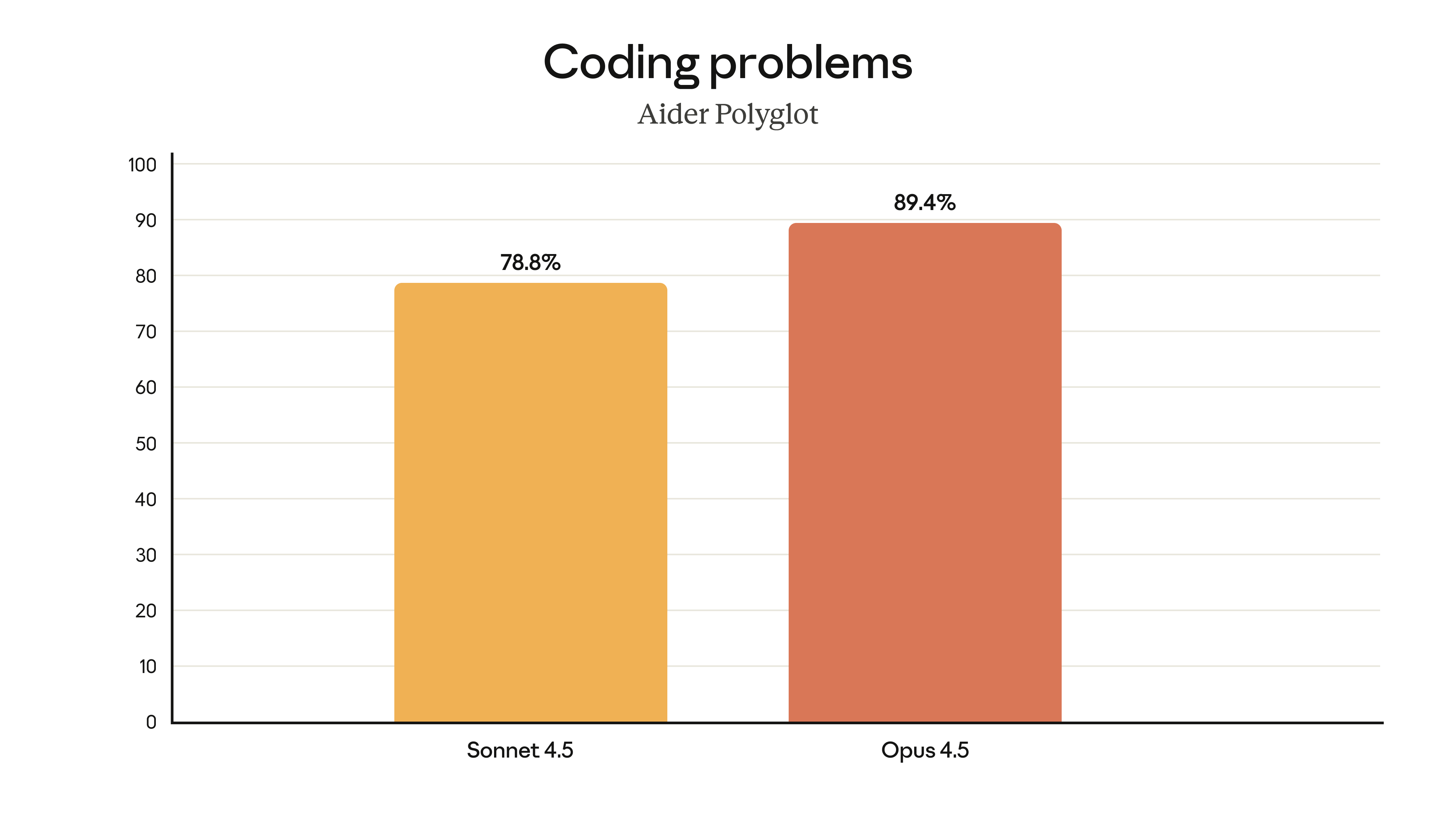
Programmer: Claude Opus 4.5 for complex projects. ChatGPT for fast code you need now.
Source: Anthropic
Pattern: People don't use just one. They use the one that best solves each specific task.
Find out more real use cases of AI in business.
Where they are going
Both companies are constantly improving. In December 2025 they launched major upgrades:
ChatGPT (OpenAI):
- GPT-5.2 (11 Dec) with 38% less errors
- GPT-5.2-Codex (18 Dec) for advanced programming
- GPT-Image-1.5 (16 Dec) 4× faster
- Sora available with Disney agreement
- Bet on being your complete multimedia centre
Claude (Anthropic):
- Opus 4.5 (24 Nov) programming leader (SWE-bench 75.5%)
- Chrome plugin for all paying users
- Expanding context to 1 million tokens
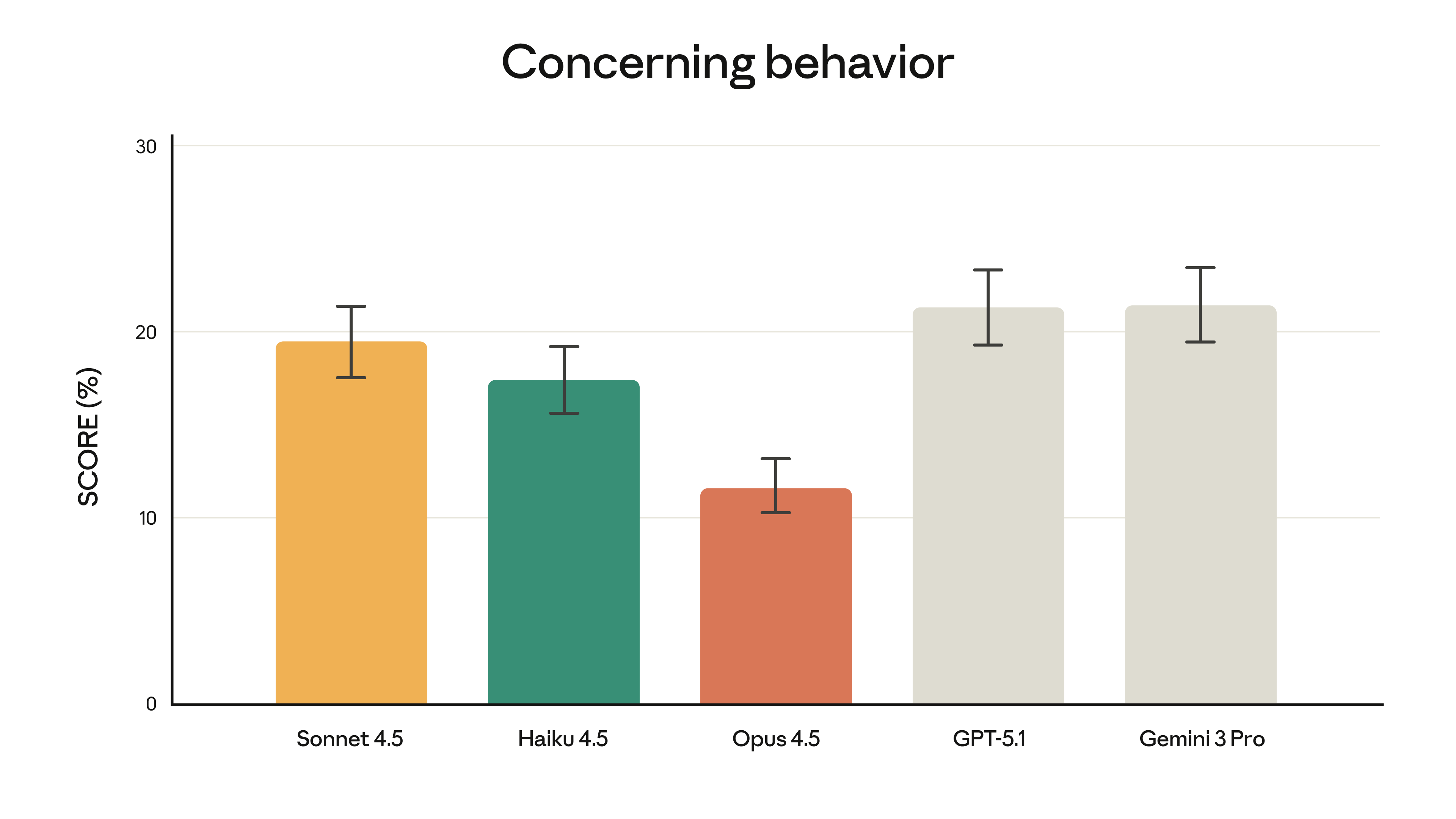
- Aiming to be the most reliable and accurate AI
- Focus on long and complex tasks
Source: Anthropic System Card
They will not converge. Each goes its own way:
ChatGPT wants to be your multimedia studio (text + image + video + audio).
Claude wants to be your reliable assistant who executes complex tasks with precision.
And that's a good thing. You have options depending on what you need.
FAQ
Can I use both?
Yes, many do. ChatGPT for videos/images, Claude for writing/documents. The free ones let you try it out. If you pay for both, it's $40/month total.
Which is faster?
ChatGPT GPT-5.2 Instant responds faster on short tasks. Claude can be slower when parsing very large docs, but reads everything in full. Sora takes 1-3 minutes to generate videos.
Which one understands Spanish better?
Both understand Spanish well. According to Anthropic, Claude Opus 4.5 has improved support for non-English languages. ChatGPT has web search advantage (more content indexed).
Which is more secure with my data?
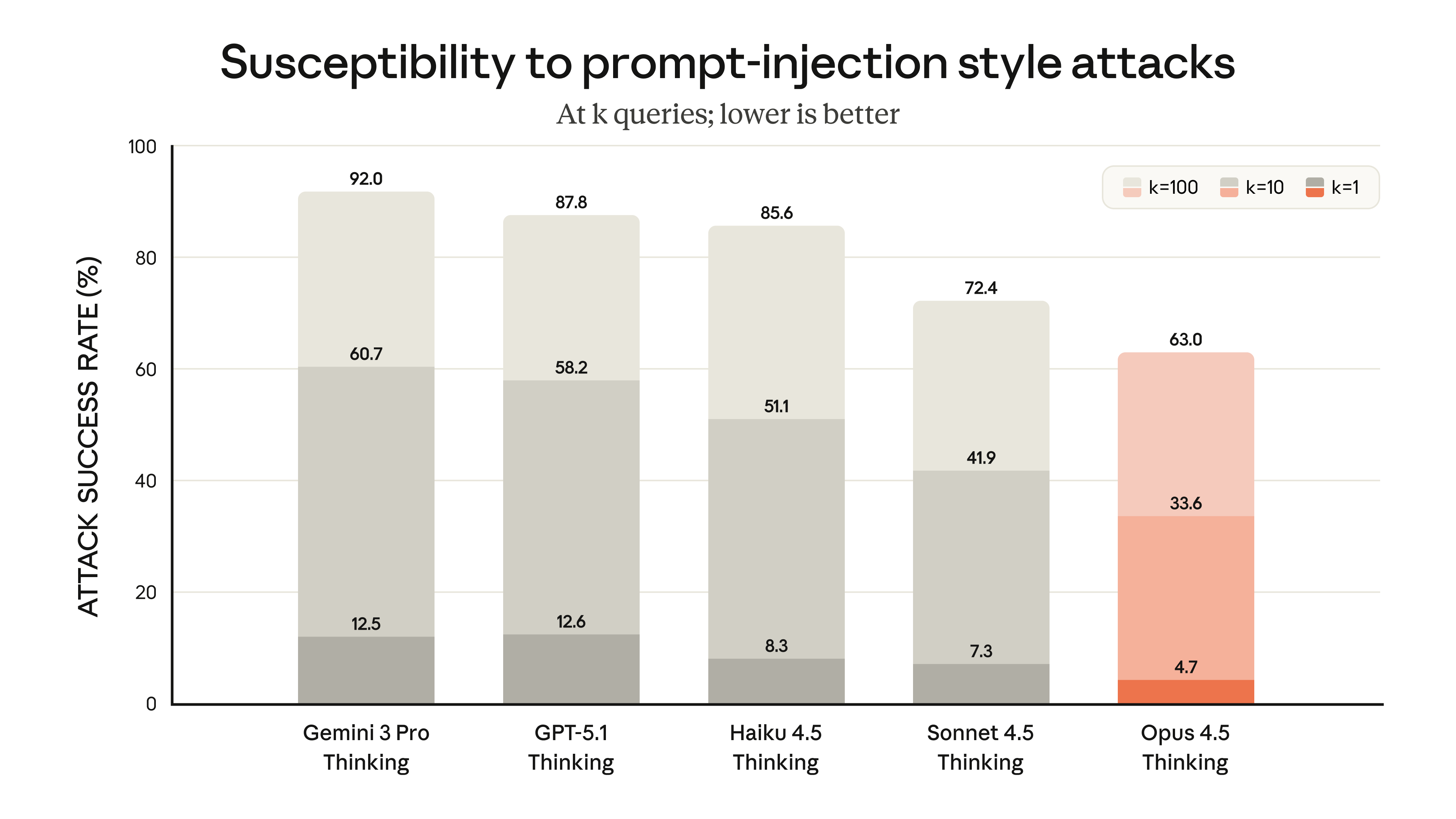
Both have privacy policies. OpenAI and Anthropic do not use your chats to train models if you have a paid account. NEVER upload passwords, bank details or ultra-sensitive client info.
Source: Anthropic System Card
Do I need to know how to programme?
No. You write in normal Spanish. If you want me to help you program, they both do (Claude writes better code). But for everyday tasks, you just write as you would write to a person.
Are Sora's videos watermarked?
Yes, all videos have a visible watermark that moves, plus an invisible one (C2PA) that certifies that it was created with AI. According to OpenAI, This is for transparency and security.
Is GPT-3.5 still available?
No. OpenAI withdrew GPT-3.5 according to its release notes. They now use GPT-5 as the base model in free accounts.
Executive summary
If you have to choose just one:
Visual content creators → ChatGPT Plus (Sora + GPT-Image-1.5)
Writers/copywriters → Claude Pro (natural tone + Chrome plugin)
Programmers → Claude Pro (leader in SWE-bench 75.5%)
Consultants with a lot of documentation → Claude Pro (200K context tokens)
Community managers → ChatGPT Plus (videos + images)
Researchers → ChatGPT Plus (web search + memory)
Yes you can have both ($40/month):
Use ChatGPT as your multimedia tool: videos, pictures, searches.
Use Claude as your text assistant: write, analyse documents, control your browser.
If you are just starting out:
Try both for free for a week. Whichever one you use more, you pay for.
The best AI is the one you use.
Endnote: Prices and functions are subject to change. OpenAI (openai.com) and Anthropic (anthropic.com) update their models regularly. Check their official websites to confirm the latest info.






 EN
EN  ES
ES  PT
PT  DE
DE  FR
FR